Built by an active flight instructor

See how DualGiven fits into a training day.

The point is not to give a CFI seven more tools. It is to make the work you already do connect—so a lesson can move from the calendar to the training record, logbooks, student progress and billing without rebuilding it in separate systems.

01ScheduleYou and the student know what is next.
02TeachThe lesson stays the focus.
03Record onceEnter and sign the completed lesson.
04UpdateLogbooks, progress and billing move together.
05Follow upEndorsements, quizzes and files stay with the student.

From your first import to your aircraft operation.

Explore the workflows that get your business set up and keep it moving.

What the product actually does.

These are screenshots of DualGiven with demonstration records. Open any image to take a closer look.

01

A schedule built around an instructor

Scheduling

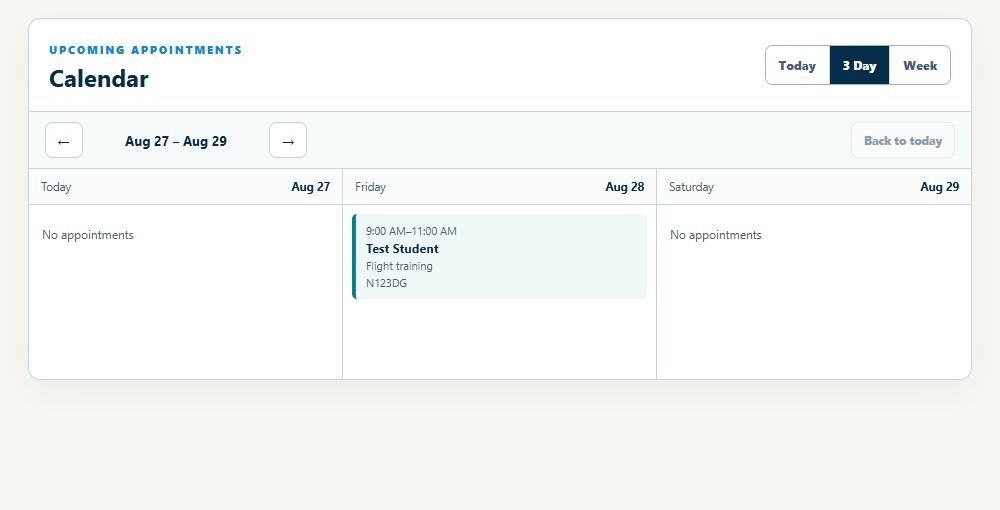
Independent instructors do not have a front desk protecting the calendar. A schedule change usually means a text thread, a weather decision, an airplane question, and another student waiting for a time. DualGiven keeps the schedule connected to the people you are actually teaching.

  • Use one training calendarGive instructor and student a shared view of upcoming lessons instead of relying on separate calendars and text-message archaeology.
  • Keep appointments tied to studentsMove from the calendar into the same student context you use for training records and follow-up.
  • Use it where the day actually happensThe scheduling experience is designed to stay usable on iPhone and iPad mini, not only at a desk.
See the scheduling workflow
DualGivenYour teaching schedule
DualGiven three-day calendar showing a flight lesson, student, time, and aircraft
Actual app · Demonstration dataView full size ↗
02

Record the lesson once

Training records & logbooks

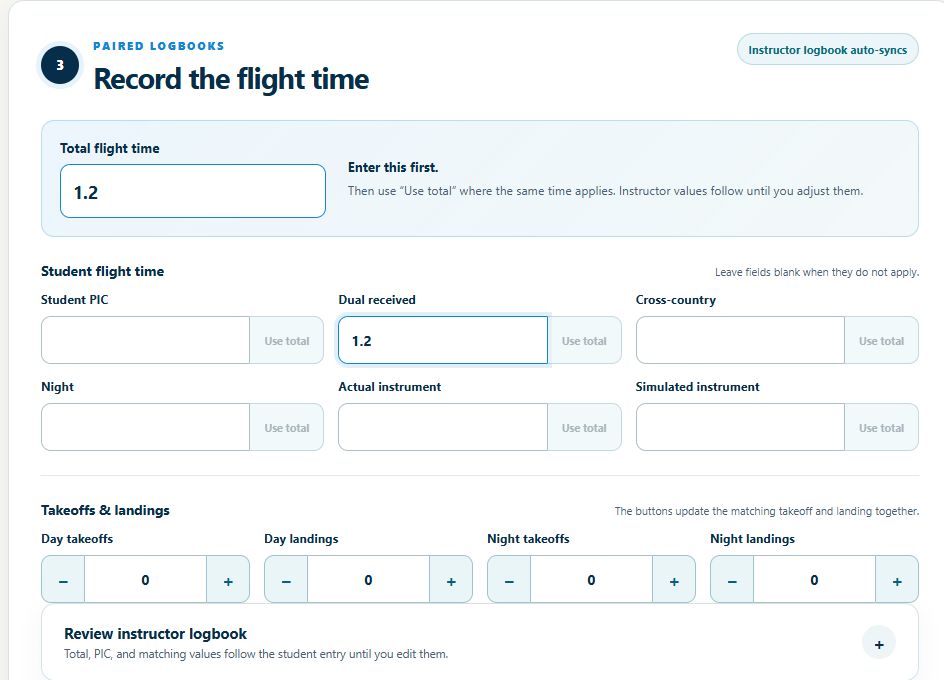
The same lesson facts tend to get entered over and over: instructor logbook, student record, progress tracker, billing notes. DualGiven is built around recording the lesson once and using that record across the rest of the instructor workflow.

  • Capture what was actually worked onRecord flight and ground lessons with the training items covered, not just a date, duration, and vague free-text note.
  • Make instructor recordkeeping easier to maintainKeep a usable history of training, endorsements, and student activity so required records are easier to find and review when you need them.
  • Keep your logbook portableImport and export logbook data with ForeFlight and LogTen workflows so DualGiven does not become a dead end for your flight history.
See the training records & logbooks workflow
DualGivenConnected instructor & student logbooks
Actual DualGiven training screen showing total flight time, dual received, landings, and linked instructor logbook review
Actual app · Demonstration dataView full size ↗
03

Know where every student stands

Student progress

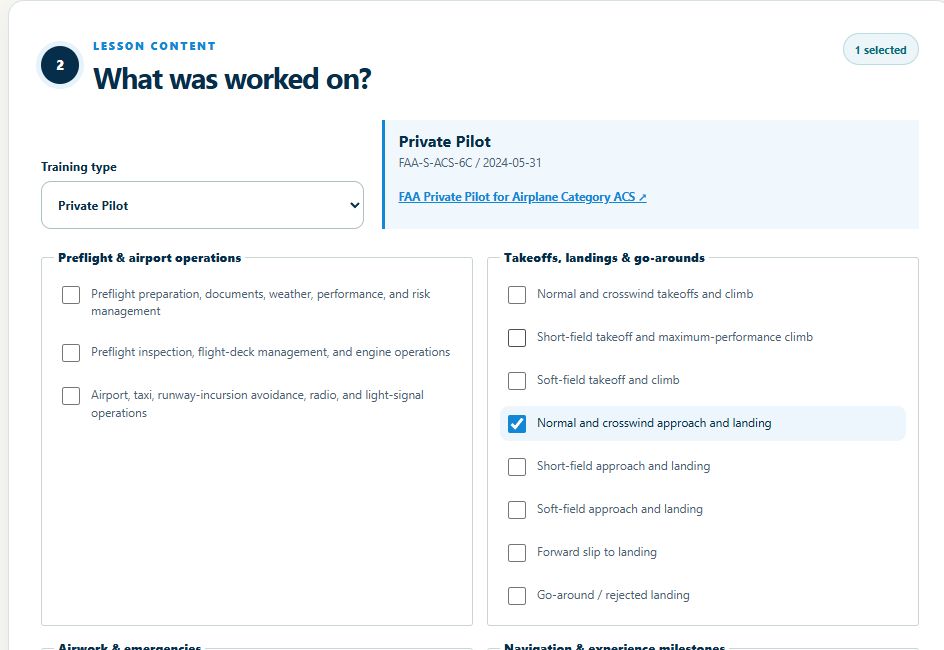
When one lesson ends and the next student is already walking across the ramp, you should not have to reconstruct their training from notes, texts, and memory. DualGiven keeps the useful parts of the student’s story together.

  • See the recent training firstOpen a student and get back into context quickly instead of digging through a chronological pile of records.
  • Keep the program visibleTrack where the student is in the assigned training program and what work is still ahead.
  • Look organized because you are organizedGive students a clear view of their training instead of making progress depend on whatever the instructor happens to remember or write down.
See the student progress workflow
DualGivenLesson content for progress tracking
DualGiven lesson content screen with Private Pilot training items used to document progress
Actual app · Demonstration dataView full size ↗
04

Endorsements with the training context beside them

Endorsements

Endorsements are easy right up until you are checking a student for solo, a knowledge test, or a practical test and trying to make sure the right combination is actually there. DualGiven keeps endorsement work attached to the student instead of scattered across templates and logbook pages.

  • Use an endorsement advisorReview likely endorsement needs in the context of the student’s current training program and phase.
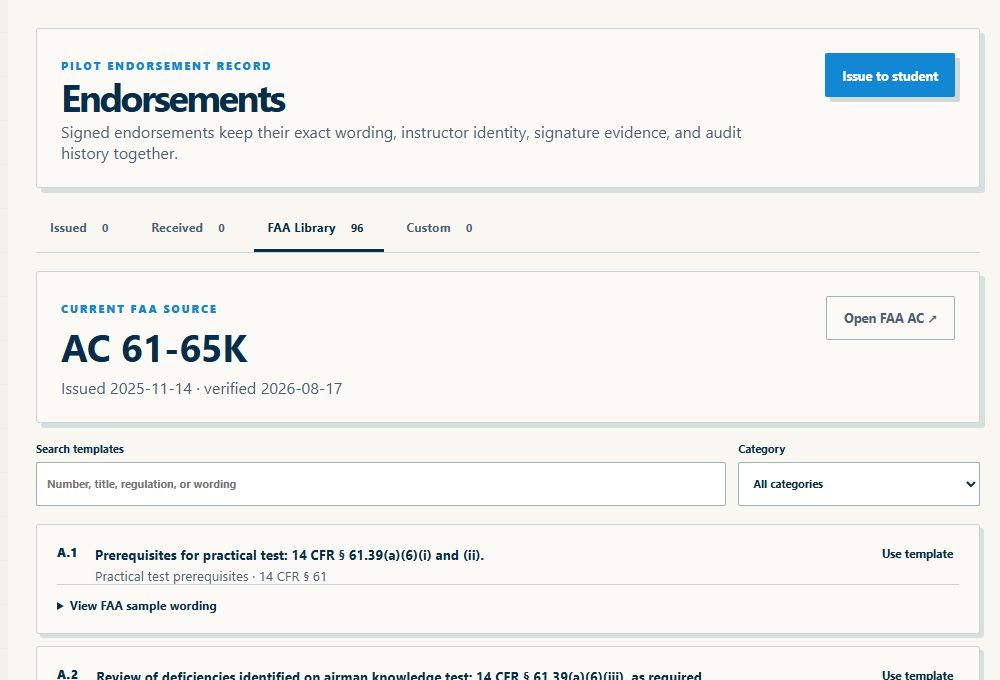
  • Issue signed endorsements in the appPrepare and sign the endorsement from the student record instead of moving between templates, PDFs, and logbook pages.
  • Do a better checkride-prep reviewKeep issued endorsements together and use the advisor as a practical checklist for what still deserves attention.
See the endorsements workflow
DualGivenEndorsement library
DualGiven endorsement workspace with the FAA template library, search, and category filter
Actual app · Demonstration dataView full size ↗
05

Give useful homework without building it from scratch

Quizzes

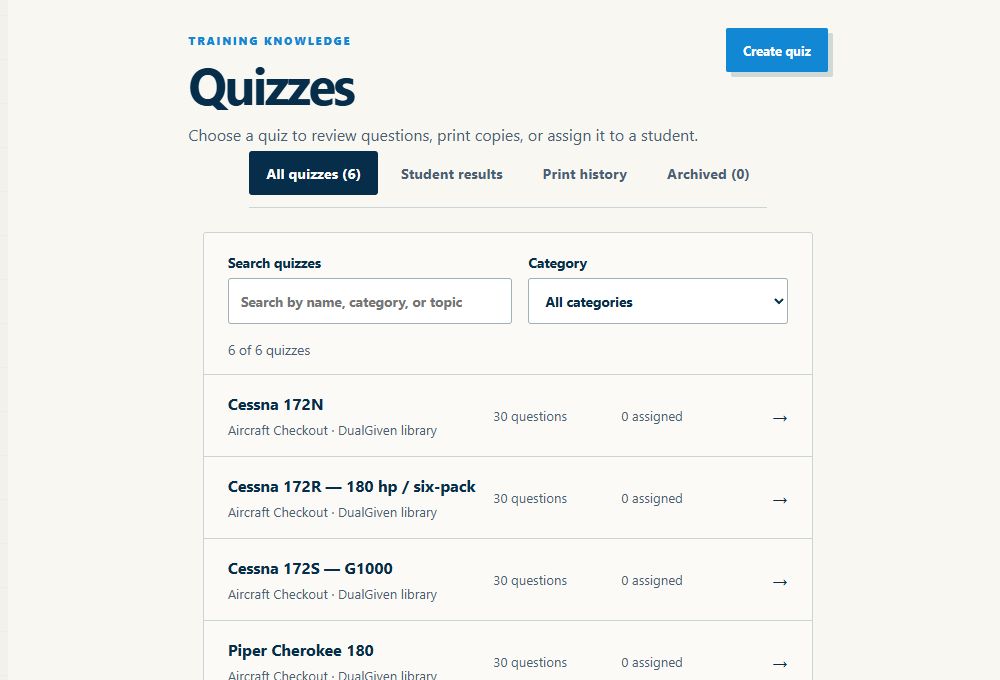
A student can leave a lesson with three things worth reviewing and still arrive next week having studied something completely different. DualGiven gives instructors a quick way to turn those weak spots into focused questions the student can complete in the app.

  • Build a quiz fasterUse AI assistance to draft questions around the topic you choose, then review and edit before assigning it.
  • Keep completion in the appStudents can take the quiz in the same place they already use for their training information.
  • Use the result in the next lessonSee how the student did and use that information to decide what deserves another explanation or another flight objective.
See the quizzes workflow
DualGivenQuiz library
DualGiven quiz library showing aircraft checkout quizzes, search, categories, student results, and print history
Actual app · Demonstration dataView full size ↗
06

Stop building a filing system for every student

Documents

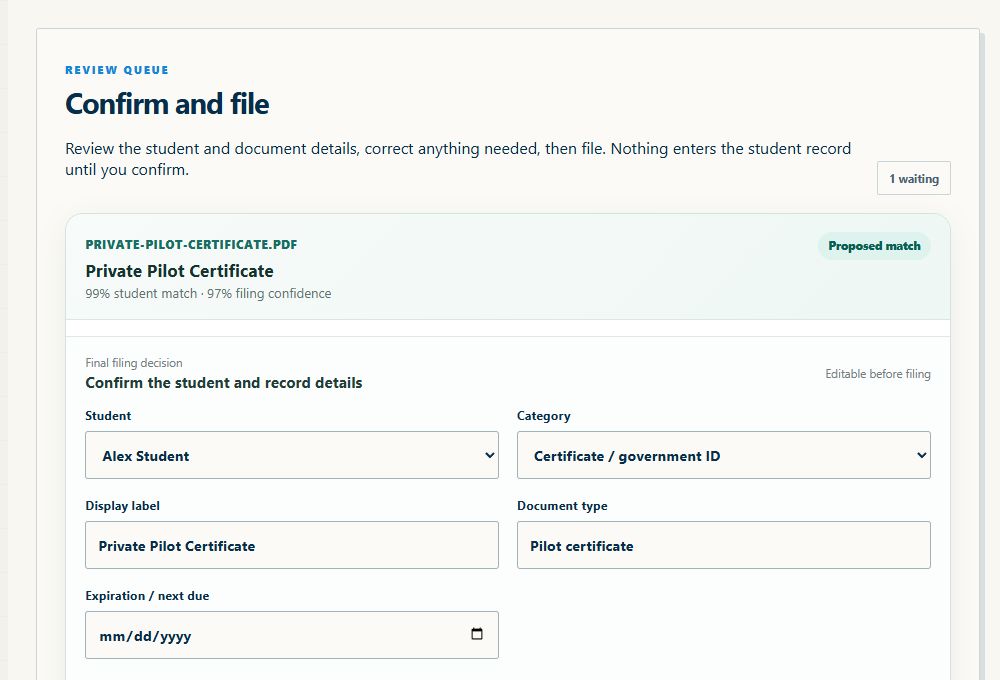
Students send instructors everything: certificates, photos, PDFs, TSA paperwork, logbook pages, and whatever else is needed that week. The useful thing is not another folder tree. It is being able to get the file into the student record and find it later.

  • Upload without a filing ceremonyGet the document into DualGiven first instead of completing a long form just to attach a file.
  • Let AI help with organizationUse the document itself to help identify and organize what was uploaded rather than requiring the instructor to describe everything first.
  • Find the record when it mattersMake pre-checkride review and routine recordkeeping less dependent on remembering which app or folder received the file.
See the documents workflow
DualGivenReview before filing
DualGiven document review screen with a suggested student match and editable certificate details before filing
Actual app · Demonstration dataView full size ↗
07

The business side should follow the lesson

Billing & payments

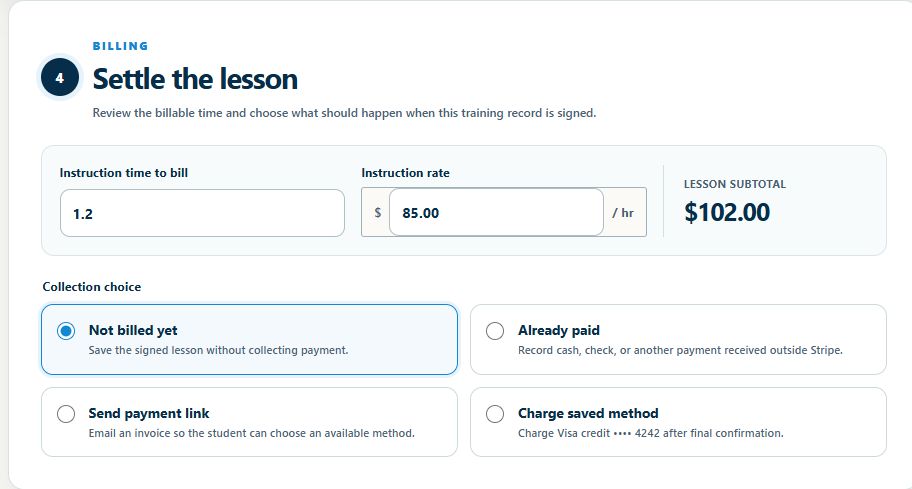
A full day of instructing already has enough unpaid work around the edges. Billing should not require reconstructing who flew, what they owe, whether they paid, and where the receipt went. DualGiven keeps the business record close to the training record.

  • Keep billing tied to the studentWork from the same student relationship instead of maintaining a separate list of who owes what.
  • Provide clean receipts and recordsGive students a professional payment trail while keeping the instructor’s own payment history easy to review.
  • Use saved payment methods for real policiesWhen enabled by the instructor, saved payment methods can support easier lesson collection and a cancellation policy that is practical to enforce.
See the billing & payments workflow
DualGivenSettle the lesson
DualGiven lesson billing showing instruction time, rate, subtotal, and choices to record payment, send a link, or charge a saved method
Actual app · Demonstration dataView full size ↗

Finish the lesson. Finish more of the paperwork at the same time.

When you record and sign completed training, DualGiven is designed around one shared lesson record. That lesson can carry the student record, instructor and student logbooks, progress evidence and your payment choice together.

See the record-once workflow →

It started with an instructor workflow, not a fleet-management checklist.

DualGiven grew out of the day-to-day work of independent instruction: keeping students moving, documenting training, knowing which endorsement comes next, staying organized, and collecting payment without building a front office.

Why I built DualGiven →

One place to run the instructor side of flight training.

Start your 30-day trial