
Enter the lesson
Start from the student and record the flight or ground lesson while the details are still fresh.
Record the lesson once
The same lesson facts tend to get entered over and over: instructor logbook, student record, progress tracker, billing notes. DualGiven is built around recording the lesson once and using that record across the rest of the instructor workflow.
$39/month or $390/year after 30 days. Card required. Cancel before your trial ends to avoid a subscription charge.
In the training day
Start from the student and record the flight or ground lesson while the details are still fresh.
Capture the training items, notes, time, and other details that matter.
Use the same lesson context for student progress, logbook history, and the rest of the postflight workflow.
What changes
Record flight and ground lessons with the training items covered, not just a date, duration, and vague free-text note.
Keep a usable history of training, endorsements, and student activity so required records are easier to find and review when you need them.
Import and export logbook data with ForeFlight and LogTen workflows so DualGiven does not become a dead end for your flight history.
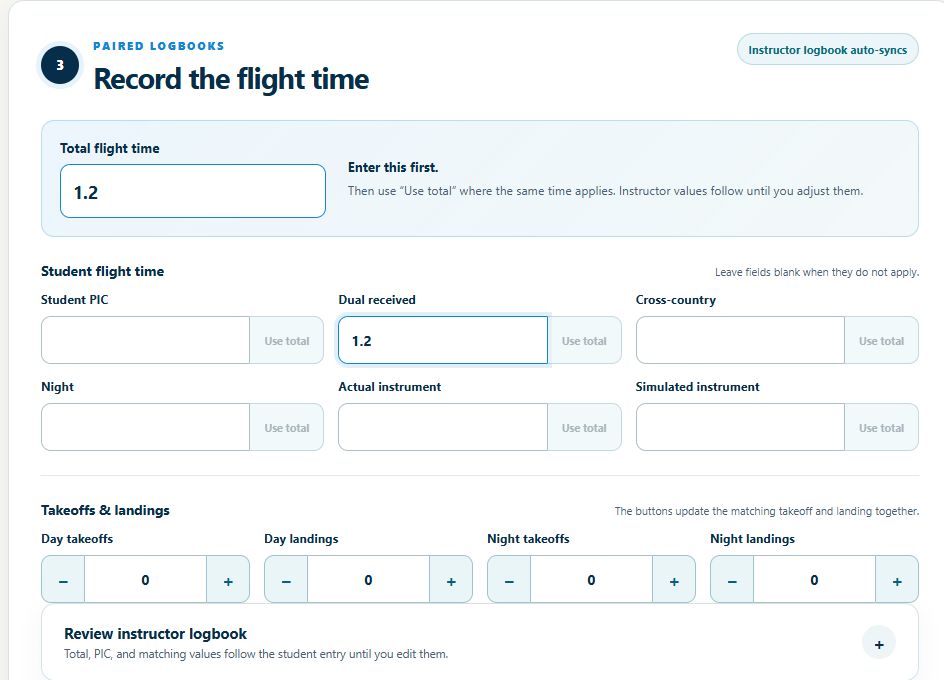
Record flight times, program-specific training items, remarks, and billable instruction time. Review the student and instructor logbook values separately, then sign the completed lesson.
Charge an authorized saved payment method, email an invoice with a payment link, or record an outside payment. Training history, logbooks, and progress stay connected to the lesson; payment status remains visible.
Import supported ForeFlight or LogTen exports. For signed records, include the source PDF so signatures and endorsements can be matched and reviewed. CSV alone does not contain signature images.
Why I built it this way
If I am already taking the time to update my logbook after a flight, I want that work to carry farther. The goal is to keep my logbook, the student’s training record, progress, and the business side of the lesson moving without retyping the same flight four times.
About Robbie and DualGiven →Before your first lesson with DualGiven
DualGiven is flight instructor software for independent CFIs and CFIIs. It brings student progress, scheduling, training records, logbooks, endorsements, quizzes, documents, and lesson billing into one workspace.
DualGiven costs $39 per month or $390 per year, with an instructor workspace, student access, and a 30-day trial. A card is required. Your subscription renews automatically after the trial unless you cancel. One airplane is included; additional airplanes cost extra. Student payment processing and platform fees are separate from your subscription.
No. Students join through your instructor workspace without a separate subscription. They get 60 days of student access when added, renewed by each instructor-signed flight. Inactive students or those who go 60 days without a signed flight keep free access to their logbook.
DualGiven supports logbook import and export workflows for ForeFlight and LogTen. Import flight entries first, then review PDF signatures and endorsements. These are file-based workflows, not a live connection to those apps.
Yes. Use DualGiven on the web and in the native iPhone and iPad apps with the same account. Start and manage your instructor subscription on the website. Supported flight capture, signatures, and scans work offline; billing, AI processing, and online tools require a connection.
You make the instructional decisions. DualGiven organizes training evidence and endorsement needs so you can review them. It does not replace your judgment about proficiency, eligibility, or readiness.
Built by an active flight instructor